Citrix Cloud
Citrix Cloud is a cloud-based management platform that provides the centralized control plane for delivering and managing all Citrix digital workspace services, including virtual apps and desktops. It allows organizations to deploy and scale workloads on any infrastructure be it on-premises or public cloud while simplifying IT operations and ensuring secure access for a distributed workforce.
What does this pack contain?
- Citrix Cloud integration that collects system log records.
- Citrix Daas integration that collects Config Logs records.
- Modeling rules for Citrix Cloud system log records
Configure Citrix Cloud Event Collector in Cortex
| Parameter | Description | Required |
|---|---|---|
| Server URL | True | |
| Client Id | True | |
| Client Secret | True | |
| Customer ID | True | |
| Max events per fetch | The maximum amount of events to retrieve. | False |
| Trust any certificate (not secure) | False | |
| Use system proxy settings | False |
Step by step configuration
Prerequisites
Get Access to Citrix Cloud
Sign up for a free Citrix Cloud account, or log in to Citrix Cloud.
Citrix Cloud API Access with Service Principals
A service Principal acts as an API client to Citrix Cloud APIs and has the following characteristics:
1. Create a Service Principal
In the Citrix Cloud console, click the menu in the upper left corner.
2. Select Identity and Access Management > API Access > Service principals > Create service principal and follow the steps to completion.
If these options do not appear, you might not have sufficient permissions to manage service principals. Contact your administrator to get the required full access permission.
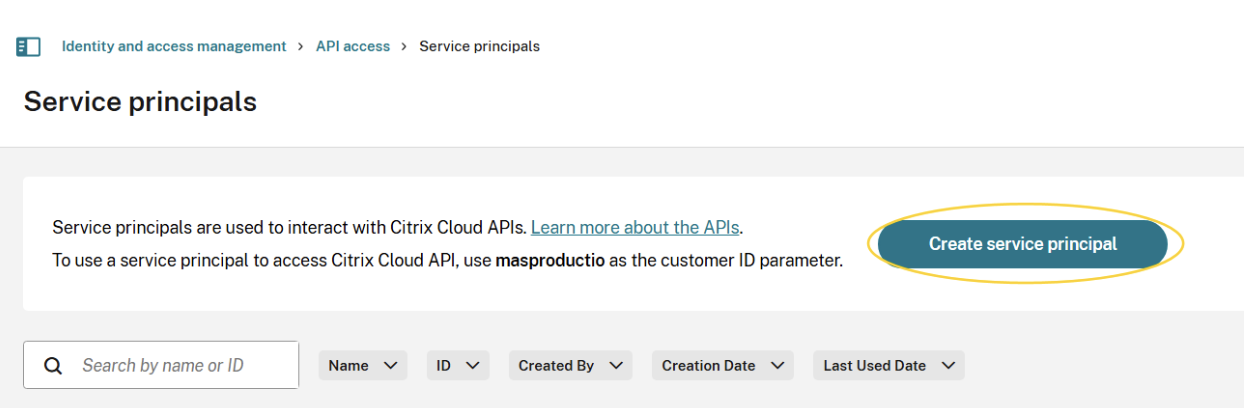
3. Add the credentials to your secret management tool as the secret will only appear once
4. Customer ID is a mandatory parameter that must be passed in the Citrix-CustomerId header. To get the customer ID:
- Log in to the Citrix Cloud.
- Select the Identity and Access Management option from the menu.
- Click the API Access tab. You can see the customer ID in the description above the Create Client button.
Steps to identify your tenant's Citrix Cloud ID
- Log in to https://citrix.cloud.com
- If you have access to more than one tenant, their names and Citrix Cloud IDs will be presented to you in a list format for you to select which one you want to sign in to. Example below:
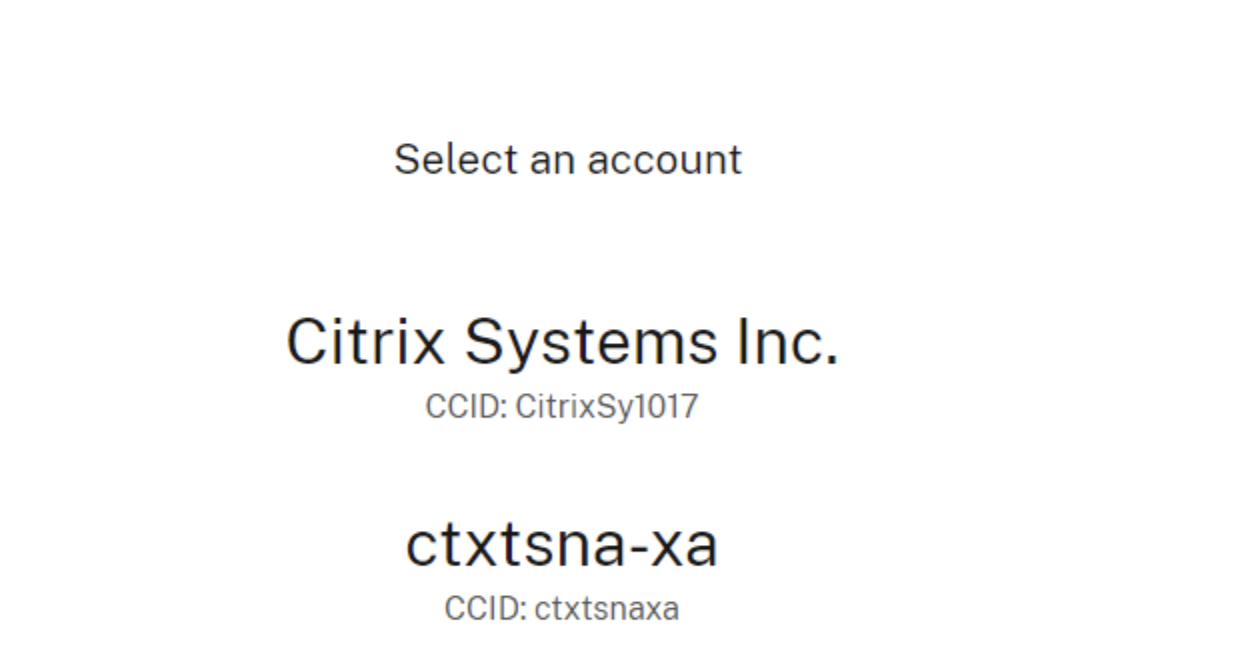
- Once you sign in, the Tenant's Citrix Cloud ID is also presented in the top right corner of the screen as shown in an example here (ctxtsnaxa)
Commands
You can execute these commands from the CLI, as part of an automation, or in a playbook.
After you successfully execute a command, a DBot message appears in the War Room with the command details.
citrix-cloud-get-events
Returns system log events extracted from Citrix.
Base Command
citrix-cloud-get-events
Input
| Argument Name | Description | Required |
|---|---|---|
| should_push_events | Set this argument to True in order to create events, otherwise the command will only display the events. Possible values are: true, false. Default is false. | Required |
| limit | The maximum number of logs to return. Default is 2000. | Optional |
| start_date_time | Start DateTime for the records to be retrieved. | Optional |
| end_date_time | End DateTime for the records to be retrieved. | Optional |
Context Output
There is no context output for this command.
Citrix DaaS Integration
Citrix DaaS simplifies the delivery and management of Citrix technologies by enabling organizations to deliver secure virtual apps and desktops from the cloud while maintaining centralized control and configuration management.
This integration manages configuration logging and administrative activities, including:
- Configuration changes initiated from the Manage section
- Administrative activities from the Monitor node
- PowerShell script execution
- REST API requests
Configure Citrix DaaS in Cortex
| Parameter | Description | Required |
|---|---|---|
| Server URL | The Base URL of the Citrix Cloud API. | True |
| Client Id | The Service Principal Client ID. | True |
| Client Secret | The Service Principal Client Secret. | True |
| Customer ID | Citrix Customer ID (Citrix-CustomerId header). | True |
| Site Name | The Specific Citrix DaaS site name (if applicable). | False |
| Max events per fetch | Maximum number of events to retrieve. Requires configuration logging database to be enabled. Results are returned most-recent first. | False |
| Trust any certificate (not secure) | Trust unverified SSL certificates. | False |
| Use system proxy settings | Use Cortex system proxy settings. | False |
Configuration Steps
The authentication setup for Citrix DaaS uses the same Service Principal process described above in the Citrix Cloud section.
Ensure that:
- The Service Principal has sufficient API permissions.
- Configuration logging is enabled in the Citrix DaaS environment.
- The correct customer ID is configured.
- (Optional) The site Name is specified if working with multiple sites.