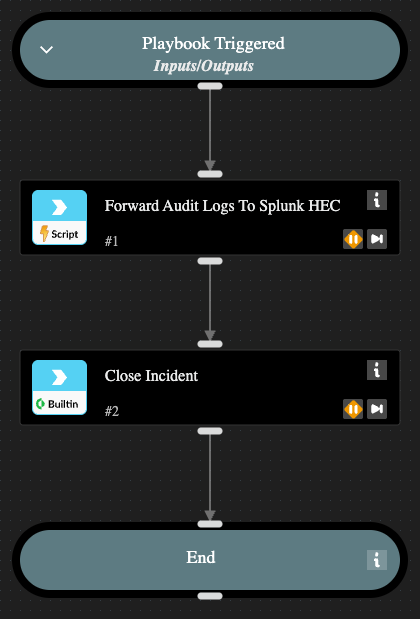
This pack allows you to setup a job to forward audit logs from XSOAR to Splunk HEC. This requires a Core REST API instance and Splunk Py instance.
Forward Audit Logs To Splunk Pack
Note: This is a beta pack, which lets you implement and test pre-release software. Since the pack is beta, it might contain bugs. Updates to the pack during the beta phase might include non-backward compatible features. We appreciate your feedback on the quality and usability of the pack to help us identify issues, fix them, and continually improve
This content pack facilitates the seamless forwarding of Cortex XSOAR audit logs to Splunk. By leveraging a specialized playbook and automation, it ensures your security telemetry is centralized for long-term retention and analysis.
How it Works
The solution utilizes an automation to extract audit logs and transmit them to the Splunk HTTP Event Collector (HEC). To maintain data integrity and prevent redundancy, the automation references an XSOAR List to track the log offset, ensuring each entry is forwarded only once.
Required Configurations
To deploy this workflow, the playbook requires the following three inputs:
- AuditLogCountList: The name of the XSOAR List created to store the log offset.
- CoreRestInstanceName: The name of the Core REST API instance configured within your tenant.
- SplunkInstanceName: The name of the Splunk integration instance configured for log ingestion.
Configure the playbook as a recurring job.
Playbook

Forward Audit Logs To Splunk Pack
Note: This is a beta pack, which lets you implement and test pre-release software. Since the pack is beta, it might contain bugs. Updates to the pack during the beta phase might include non-backward compatible features. We appreciate your feedback on the quality and usability of the pack to help us identify issues, fix them, and continually improve
This content pack facilitates the seamless forwarding of Cortex audit logs to Splunk. By leveraging a specialized playbook and automation, it ensures your security telemetry is centralized for long-term retention and analysis.
How it Works
The solution utilizes an automation to extract audit logs and transmit them to the Splunk HTTP Event Collector (HEC). To maintain data integrity and prevent redundancy, the automation references an XSOAR List to track the log offset, ensuring each entry is forwarded only once.
Required Configurations
To deploy this workflow, the playbook requires the following three inputs:
- AuditLogCountList: The name of the XSOAR List created to store the log offset.
- CoreRestInstanceName: The name of the Core REST API instance configured within your tenant.
- SplunkInstanceName: The name of the Splunk integration instance configured for log ingestion.
Configure the playbook as a recurring job.
Playbook