
Cohesity Helios

Download With Dependencies

This integration interacts with Cohesity Helios and performs actions based on alerts raised.

Cohesity Helios, a next-gen data management platform, delivers a unique combination of an immutable file system with DataLock capabilities, anomaly detection, policy-based data isolation, quorum and MFA to prevent backup data from becoming part of a ransomware attack.

This content pack from Cohesity provides Cortex XSOAR customers with alerts by integrating ransomware detection into an automated playbook for managing ransomware attack recovery to help reduce ransomware risk.
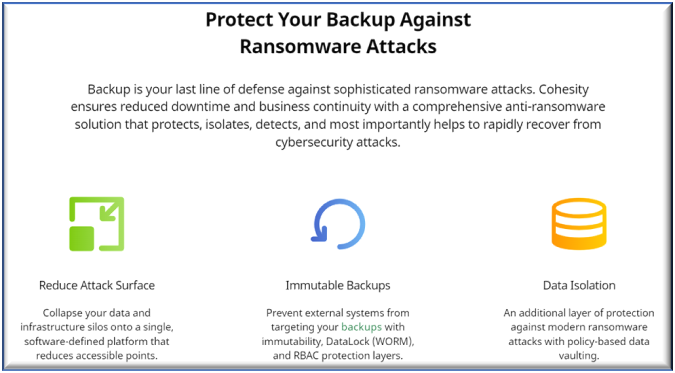
Protect Backup

Cohesity’s comprehensive, end-to-end solution Cohesity Ransomware features a multi-layered approach to protect backup data against ransomware, detect, and rapidly recover from an attack. Cohesity’s unique immutable architecture ensures that your backup data cannot be encrypted, modified or deleted. Using machine learning, it provides visibility and continuously monitors for any anomalies in your data. And if the worst happens, Cohesity helps to locate a clean copy of data across your global footprint, including public clouds, to instantly recover and reduce downtime.
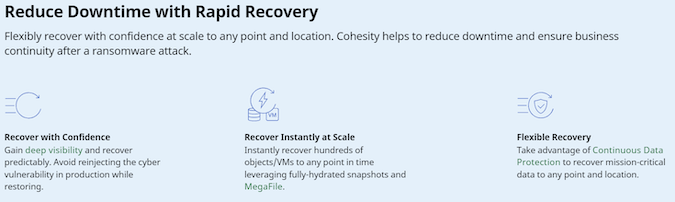
Reduce Downtime

What does this pack provide?

  • Cohesity Helios and Cortex XSOAR enable your security and IT teams to recover from ransomware attacks.

  • Command to fetch ransomware alerts based on attributes such as time duration, severity level, cluster identifiers and region identifiers.

  • Command to restore a specified backed up object from its latest clean snapshot.

  • Command to ignore a specified ransomware alert.

v2 API migration updates

  • The pack now uses the Cohesity v2 alerts endpoint: /v2/mcm/alerts.
  • The commands cohesity-helios-ignore-anomalous-object and cohesity-helios-restore-latest-clean-snapshot now require alert_id.
  • The cohesity-helios-get-ransomware-alerts command outputs include cluster_id, cluster_name, entity_id, and job_id.

Example commands:

!cohesity-helios-get-ransomware-alerts limit=10 alert_severity_list=kCritical
!cohesity-helios-ignore-anomalous-object alert_id=9346668452014081:1632849269030240
!cohesity-helios-restore-latest-clean-snapshot alert_id=2122491972847952:1632848348897740

Cohesity Helios, a next-gen data management platform, delivers a unique combination of an immutable file system with DataLock capabilities, anomaly detection, policy-based data isolation, quorum and MFA to prevent backup data from becoming part of a ransomware attack.

This content pack from Cohesity provides Cortex customers with alerts by integrating ransomware detection into an automated playbook for managing ransomware attack recovery to help reduce ransomware risk.

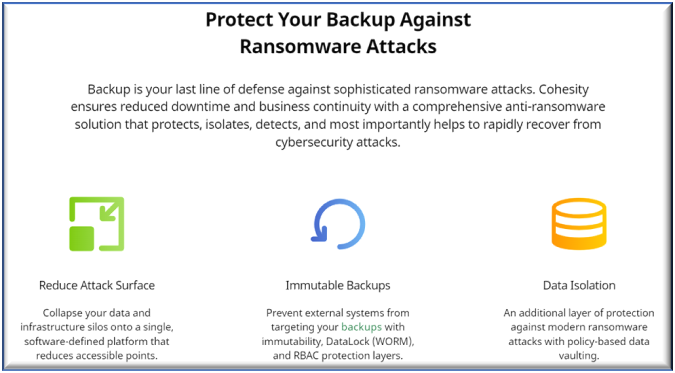
Protect Backup

Cohesity’s comprehensive, end-to-end solution Cohesity Ransomware features a multi-layered approach to protect backup data against ransomware, detect, and rapidly recover from an attack. Cohesity’s unique immutable architecture ensures that your backup data cannot be encrypted, modified or deleted. Using machine learning, it provides visibility and continuously monitors for any anomalies in your data. And if the worst happens, Cohesity helps to locate a clean copy of data across your global footprint, including public clouds, to instantly recover and reduce downtime.

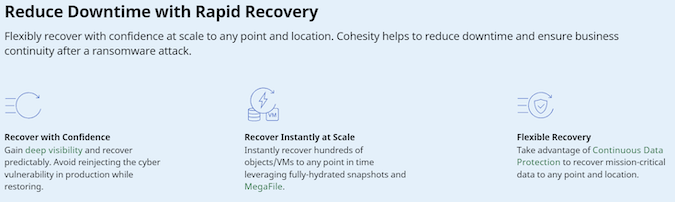
Reduce Downtime

What does this pack provide?

  • Cohesity Helios and Cortex enable your security and IT teams to recover from ransomware attacks.

  • Command to fetch ransomware alerts based on attributes such as time duration, severity level, cluster identifiers and region identifiers.

  • Command to restore a specified backed up object from its latest clean snapshot.

  • Command to ignore a specified ransomware alert.

v2 API migration updates

  • The pack now uses the Cohesity v2 alerts endpoint: /v2/mcm/alerts.
  • The commands cohesity-helios-ignore-anomalous-object and cohesity-helios-restore-latest-clean-snapshot now require alert_id.
  • The cohesity-helios-get-ransomware-alerts command outputs include cluster_id, cluster_name, entity_id, and job_id.

Example commands:

!cohesity-helios-get-ransomware-alerts limit=10 alert_severity_list=kCritical
!cohesity-helios-ignore-anomalous-object alert_id=9346668452014081:1632849269030240
!cohesity-helios-restore-latest-clean-snapshot alert_id=2122491972847952:1632848348897740

  • Rest API integration for your Cohesity Helios

  • Audit and Alert logs XDM mapping

Generate an api key from Helios UI

  1. Login to Helios UI.
  2. Click on Settings icon on top right corner and select Access Management.
  3. From the available tabs, select API Keys.
  4. Click on Add API Key button.
  5. Give the apiKey a name and click the Save button.
  6. Copy the key.

Configure CohesityHelios in Cortex

Parameter Description Required
Your server URL True
API Key The API Key to use for connection True
Trust any certificate (not secure) Trust any certificate (not secure). False
Use system proxy settings Use system proxy settings. False
Incident type False
Maximum number of incidents to fetch every time True
First fetch timestamp False
Fetch incidents False
Incidents Fetch Interval False

PUBLISHER

PLATFORMS

Cortex XSOARCortex XSIAM

INFO

CertificationRead more
Supported ByPartner
CreatedOctober 4, 2021
Last ReleaseJune 9, 2026
WORKS WITH THE FOLLOWING INTEGRATIONS:

DISCLAIMER
By downloading or using Marketplace content, you agree to the applicable Terms of Use and End User License Agreement. Third-party content is provided by its publisher, and Palo Alto Networks does not warrant, endorse, support, or assume responsibility for content not expressly identified as owned by Palo Alto Networks.